05 11 月, 2025
|10 分鐘

新的 Search Console Insights 功能不僅僅是一次「報告清理」式的整理。對於 B2B 行銷人員而言,它是一個由 AI 驅動的策略性信號,用於辨識高意向買家需求與新興市場趨勢。
Google 最近在 Search Console Insights 中引入「Query Groups」,稱此舉的目標是透過將相似的使用者意圖分組,讓冗長、雜亂的查詢清單分析起來「不那麼繁瑣」。
對於以高考慮度、低搜尋量、以及高意向關鍵字為核心的 B2B 行銷人員而言,「不那麼繁瑣」只是輕描淡寫。這不僅是清理——這是一顆水晶球。
我們長期面對的挑戰是把碎片化的長尾查詢拼接在一起,以瞭解複雜買家實際在試圖解決的問題。直到現在,這通常需要慢速、手動的分析。
透過這次更新,Google 的 AI 終於承擔了艱巨的工作,將我們的工作從關鍵字報告轉向意圖分析——這對 B2B SEO 是一個根本性的躍進。
在進入策略之前,讓我們先快速拆解一下 Query Groups 更新究竟是什麼。
根據 Google 的公告,Search Console Insights 中新的「Queries leading to your site」卡現在將會: Group Similar Queries: 它使用 AI 將查詢變體(拼寫錯誤、不同措辭)彙整成反映相似使用者意圖的單一「群組」。注意:群組是動態計算,可能會演變,且不會影響搜尋排名。 Show Group Performance: 與其只看到單一詞的點擊量,不如看到整個群組的總點擊量,讓你獲得更高層次的視角。 Provide a Drill-Down: 這是重點。你可以點擊任意群組,被「導向到表現報告,查看構成該群組的所有個別、粒度查詢」。【X2399X]/span> Spotlight Trends: 該卡片會自動顯示哪些群組按流量為「Top」、「Trending up」(點擊增長最大)以及「Trending down」(點擊下降最大)。此功能將在接下來的數週逐步推出,僅適用於查詢量較高的站點。 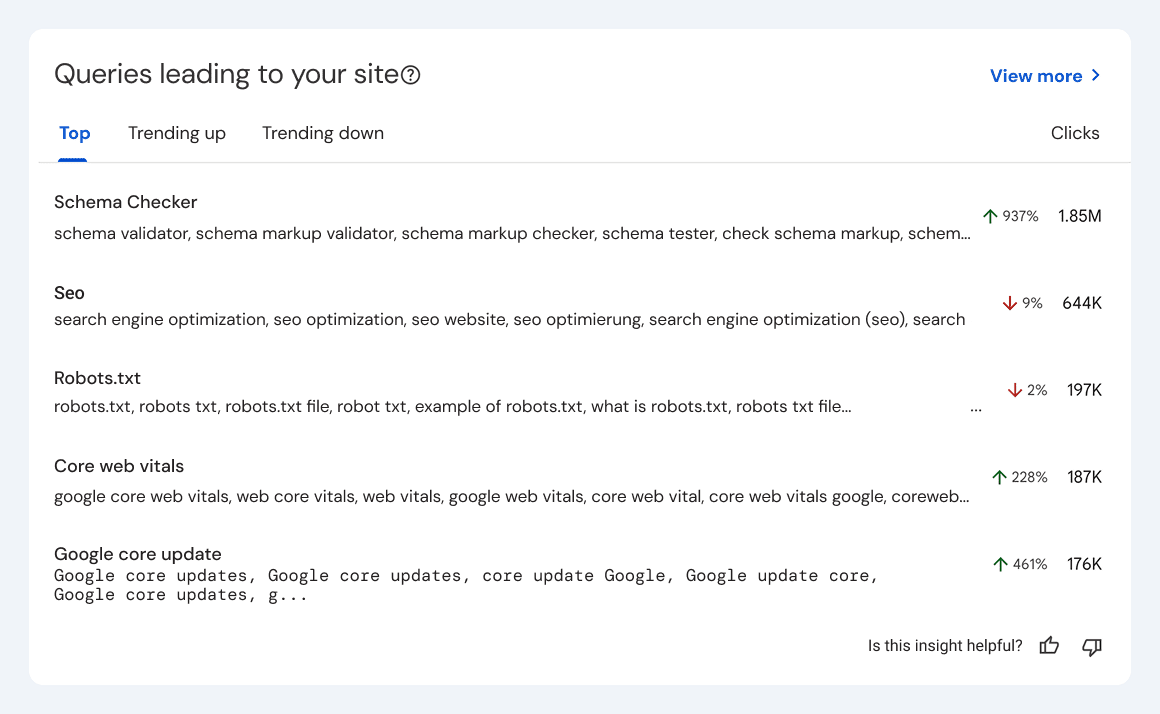 Image source Now that we’ve covered the basics, here’s what those features actually mean for a B2B marketer.
What Google Says: “Query groups solve this problem by grouping similar queries… they reflect a similar user intent.” For years, the most contentious debate in B2B content strategy meetings has been around structure. “Is this one big pillar page, or five separate blog posts?” We’ve all been there. Your SME (Subject Matter Expert) insists that “kubernetes cost monitoring” and “finops for EKS best practices” are 完全不同的主題。你的 SEO 經理,手握關鍵字工具,認為它們在語義上相關,應該放在同一頁面以建立權威。 結果?一個兩難的折中:要麼是臃腫、缺乏焦點的「怪物」文章,要麼是五篇薄弱、專 niche 的文章,彼此競爭相同的 SERP( Keyword cannibalization 的經典案例)。 這次更新結束了這場辯論。[X5258X]strong>Google 現在是你客觀、AI 驅動的主持人。 透過將 “kubernetes cost monitoring”, “finops for EKS best practices”, and “how to reduce GKE egress fees” into a single query group, Google isn’t just “tidying up” your report. It is making a definitive statement about user intent. It’s telling you: “The same person (your potential buyer) searches for all these things as part of the same problem-solving journey.” This feature hands you your content clusters on a silver platter. The Old Way (Pre-Query Groups): You log into GSC and see this:
Your Action: You assign four different, 1,200-word blog posts to your content team. Your engineering resources are stretched thin writing them, and your authority on the overall topic is diluted across four separate URLs. The New Way (With Query Groups): You log into GSC Insights and see one card:
Your Action: You greenlight one authoritative, 3,500-word pillar page titled “The Ultimate Guide to Kubernetes Cost Management & FinOps.” Then, you click the “drill-down” feature and hand the list of granular queries to your writer. Those queries become your H2s, H3s, and FAQ schema:
This isn’t just more efficient; it’s more effective. You’re creating the exact comprehensive resource Google’s AI has already identified as matching the full spectrum of a user’s intent. You’re no longer guessing at semantic relationships; you’re using Google’s own map. This is gold for mapping content directly to your buyer’s journey, from early “what is” questions to later “how-to” problem-solving.
What Google Says: “You can click any group and be directed to the performance report to see all the individual, granular queries that make up that group.” 當 B2B 行銷人員首次看到「Query Groups」公告時,我們都感到一陣「not provided」的恐慌。Google 正在抽象化我們最有價值、最高意向、長尾數據的恐懼感非常現實。 這一句話——「你可以點擊任意群組… 看到該群組的所有個別、粒度查詢」——是整個公告中最重要的部分。數據並沒有消失。也不是被隱藏。只是被給予了一個「boss/主管」的 boss.”[ 此更新不是關於 更少的 data;而是關於 更好組織的 data。它給我們的是兩全其美的局面:一個高階的「執行摘要」用於策略,一個「深入挖掘」的實作細節用於執行。 對於 B2B 行銷人員而言,這種結構是完美的。它解決了巨大的內部報告問題:如何在不讓不同利益相關方感到不知所措的情況下傳達績效。
Your CMO doesn’t have time to parse a 10,000-row CSV of query variations. They need the “so what.” The “Group” view is the “so what.” Your Report: “這個季度,我們的「Data Observability Platforms」主題(新的一個 Query Group)推動了 organic 產生的新演示需求佔比的 40%。它是我們表現最好的群組。同時,舊有的「ETL Monitoring」群組正出現「Trending down」的趨勢,暗示市場正在變化,而我們正在捕捉這一變化。” The Value: 這是一個乾淨、戰略性的敘事。你以 market categories 與 topic performance, not just keywords. It directly ties content performance to the high-level business strategy. For Your Content & Product Teams (The “Drill-Down” View) This is where you, the marketer, find the real gold. You click that “Data Observability Platforms” group, and you get the raw, unfiltered voice of your customer. Your Report: “I drilled down into the ‘Data Observability’ group. The highest-click queries aren’t just generic. I’m seeing:
The Value (for Content): 這是你未來三個月的編輯日曆。你現在有證據證明你的受眾在資料轉換、雲端資料倉儲、以及資料編排方面遇到困難,能撰寫高度具體、解決問題的文章,且確保確實有讀者。 The Value (for Product Marketing): 這是直接提供給你的產品團隊的資料。你可以對他們說:「市場正在明確地搜尋『cloud data warehouse quality alerts』。我們與雲端資料倉儲的整合是主要的銷售支援資產。我們需要一份單頁、新的落地頁,並且就此使用案例安排一場網路研討會。數據證明了這一點。」 這種兩層制式讓你可以向上管理戰略洞見(群組),並向下管理有戰術性、可行的資料(深入挖掘)。這不是抽象概念;它是一個內建的報告框架,能將「做什麼」和「為何」清楚分離。
What Google Says: The card groups queries by “Top,” “Trending up,” and “Trending down.” This is it. This is the feature that matters more than anything else. The “Top” groups are a vanity metric; the “Trending” groups are a compass. This one feature single-handedly transforms Search Console Insights from a historical report into a forward-looking, strategic dashboard. For B2B, where identifying a market shift six months before your competitors can mean capturing an entire new category, this is the whole game. This card is no longer an “SEO report” you send to your content team. It’s a “Market Intelligence Brief” you send to your heads of Product, Sales, and Demand Gen. Here’s how to use it.
當 B2C 行銷人員看到主題「trending up」時,他們會想:「好棒,又有新文章。」當 B2B 科技行銷人員看到一個 新查詢群組「trending up」時,這是一個緊急信號。它是市場直接、未經過濾的訊號,說明出現了一個新、迫切且先前尚未明確表述的 <>問題正在形成。 這不僅僅是「SEO 機會」。它是收入機會。 Example: 一家為 DevOps 團隊提供雲端資料平台的 B2B SaaS 公司看到新的群組稱為 “AI-assisted code review”突然開始出現「Trending up。」 The Old (Reactive) Action: 這個 SEO 經理指派一篇文章:”What is AI-Assisted Code Review?” 它獲得了 500 次點擊。 The New (Proactive) B2B Action: 這是一個全員出動的信號,告知你整個 go-to-market 運作: Product Marketing: 你有一個新的、經過驗證的痛點。這個痛點是否已被你的產品解決?若解決,立刻啟動新的落地頁、一頁式介紹以及競品比較矩陣。如果尚未解決,直接把這些數據帶給產品團隊,作為路線圖新增功能的證據。直接送給產品團隊作為新功能的證據。 Sales Enablement: 你的銷售團隊可能在通話中聽到這些反對意見 现在. 你使用「drill-down」功能查看細粒度查詢(“github copilot vs. custom code review”, “security risks of AI code review”). 你立即建立一張銷售對抗卡,標題為「Handling AI Code Review Objections」,以及一份單頁 PDF:「How Our Platform Complements (or Replaces) AI Review Tools。」 Demand Gen: 你有一個新的高意向主題 <>before it’s saturated and expensive. You immediately launch a “test” paid search campaign against this query group and make it the theme of your next webinar. You are capturing demand while your competitors are still debating the blog title.
Just as valuable as knowing what’s next is knowing what’s <>over. In B2B tech, we waste millions of dollars in ad spend and content resources propping up “solved problems.” This feature is your permission to stop. 當「Top」群組在連續兩三個週期出現「Trending down」時,不僅僅是小幅波動。這是「日落」信號。市場正在移動。問題已解決,或術語已改變。 Example: A cloud data platform sees its core money-making group, “legacy data warehouse migration”, on a steady “Trending down” decline for six months. The Old (Panicked) Action: “SEO is down! Double the ad budget on these keywords! Refresh all the old migration blogs!” The New (Strategic) B2B Action: You accept the data. The market isn’t searching for “migration” anymore; they’ve migrated. Their new problems are different. Ad Budget: You immediately pull your expensive, low-performing ad budget from the “legacy migration” campaign. You re-allocate that entire budget to the new “Trending up” group (e.g., “multi-cloud data governance”) where you can be the dominant, first-mover voice. Content Strategy: 你不再「翻新」你的 101 級遷移內容。相反,將其視為「已解決的問題」並進行轉型。你新建一個名為「Post-Migration Optimization」的內容群集,並用你舊的「migration」文章連結到這個新、更高階的內容,將用戶引導到他們的下一個邏輯步驟。up to this new, more advanced content, capturing the user in their next logical step. Customer Marketing:>/b< 你通知你的客戶成功團隊。這是個信號,表示即使是現有客戶也已經超出初始問題。現在是建立保留與追加銷售活動、聚焦於如「成本優化」與「資料品質」等新問題,而非你已經解決的問題時機。
其餘行銷界的人會把 Google 的新「Query Groups」視為只是戰術性的 SEO 更新。他們會哀悼 granular、日常查詢數據的「損失」,並視為又一個「not provided」的煩惱。 讓他們去吧。 對於 B2B 科技行銷人員而言,此次更新是一份戰略性的禮物。儘管正式公告內容普遍,其對 B2B 的影響深遠:它是 Google 明確允許你停止執迷於 10,000 個長尾關鍵字變化的戰術噪音,開始專注於市場的戰略信號。 這個新儀表板並非讓 SEO 實習生找出幾個關鍵字差距的工具。這是供你的領導團隊使用的工具。 Google just handed you, on a single screen:
這不再是一個「SEO 工具」。它是產品行銷、銷售推動與 go-to-market 指南。 當你的競爭對手忙於試圖反向工程群組,讓他們拿回舊的、凌亂的 CSV,這時你應該在進行截然不同的對話。 你應該把「Trending up」卡帶去你的產品團隊,把「Trending down」卡帶給你的付費媒體主管,把「Drill-Down」查詢清單交給你的銷售推進線索。 Google 剛剖示了市場想要什麼。你唯一的工作,就是立即採取行動——從今天開始。
Please enter your email address so we can send you a one-time pass code and verify if you are an existing subscriber.
 HK
HK 

 HK
HK